Summer Sled Arcade Runner
Reviews
Description
Game Introduction
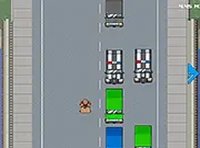
Summer Sled is a lighthearted 2D infinite runner that puts you in the shoes of a mischievous Bahamian child racing a wooden sled down a busy Miami highway. Your goal is simple: dodge oncoming traffic by tapping left or right. The game is packed with bewildered drivers, level crossings, and intersections, creating a chaotic yet hilarious experience. Randomized voiceovers, like a preppy kid or a self-absorbed adult, add to the fun. An origin story explains why a kid is sledding on a one-way road, making this game both entertaining and unique. Perfect for quick play sessions, Summer Sled offers endless replayability with its addictive gameplay and humorous touches.
How to Play
To play Summer Sled, use the left and right buttons on your keyboard or mouse to steer your sled and avoid oncoming cars, trains, and other obstacles. The game is designed for desktop play, so no mobile support is available. Tap quickly to weave through traffic and survive as long as possible. The longer you last, the higher your score. Full screen mode is available for a more immersive experience. Just click the full screen button to expand the game window. It is simple to learn but challenging to master, making it great for players of all ages.
Game Features
Endless running keeps the action going. Funny voiceovers add personality and laughter. A unique origin story gives context to the silliness. Simple controls make it easy to pick up and play.
Tips for Success
To succeed in Summer Sled, practice quick reflexes to dodge traffic efficiently. Stay focused on the center of the screen to anticipate obstacles early. Take short breaks between runs to maintain concentration. Experiment with different tapping rhythms to find what works best for you. Remember that each run is unique due to randomized traffic patterns, so adapt quickly and enjoy the humor. With consistent practice, you can achieve higher scores and extend your playtime.
❓ Having issues?
✅ This game supports: - Desktop browsers (Chrome, Edge, Safari) - Mobile browsers (Chrome on Android, Safari on iOS) ❌ Does NOT support: - Internet Explorer - Very old browser versions 👉 Try refreshing or updating your browser