
Core Creative Process
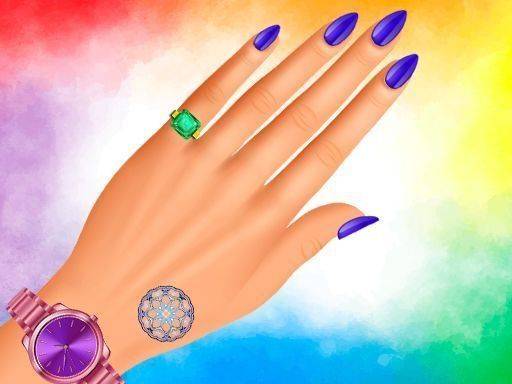
This online tool puts you in charge of a virtual nail design station. You begin by picking a nail shape from several options, then choose a base color that sets the tone. A brush tool lets you draw freehand patterns or fill areas with solid shades. The interface is straightforward, making it easy to switch between tools and adjust your work at any point.
Decoration Options
Beyond basic painting, the studio offers a selection of decorative elements. Small stickers in shapes like flowers or geometric forms can be placed onto the nail surface. Additional items such as rings and temporary tattoos provide further ways to personalize each design. These components can be layered and moved around, giving you control over the final look.
Undo and Redo System
A full undo and redo feature supports experimentation without penalty. If a pattern doesn't work out, you can step back through your changes. This system encourages trying bold color combinations or intricate sticker arrangements, knowing that any misstep can be quickly corrected.
Saving and Sharing
Completed designs can be saved to a personal gallery within the application. Some versions also allow sharing your creations with other players or on social platforms. This feature helps you track your progress and get inspiration from the work of others.
Platform and Accessibility
The studio runs directly in a web browser on both desktop and mobile devices. No software installation is required, and the controls are designed to work with touch or mouse input. This makes it accessible for quick creative sessions during a break or longer periods of focused design work.







Comments
0 comments